
TAPE CUTTERS · CUT LENGTH
The panel says 200 and the pieces measure 180. Or they come out 230. Before you blame the material or the operator, check two settings. Often that is all it takes.
An order calls for 200 mm straps. The machine is set, the counter runs, and a few hundred pieces later someone checks one with a tape measure. They are all short. Every piece is the same, so the machine is clearly repeating something. It just isn't the length on the screen.
When a tape cutter cuts consistently shorter or longer than the set length, the cause is often in the settings rather than the blade. This guide follows the checks shown in the video: first the compensation value, then a reset of the feed length made while switching the machine on.
THE SHORT ANSWER
Cut one piece and measure it. If it is off, look at the length compensation value on the control panel. In the video it had been changed to 30, and setting it back to the default 50 brought a 200 mm setting back to 200 mm. If the compensation is right and pieces are still short, the controller in the video is reset by holding FORWARD while switching on until it beeps twice. If pieces are too long, hold BACK while switching on instead. Then cut and measure again.
- 01 Why the length drifts
- 02 Measure first
- 03 Compensation
- 04 Still short
- 05 Too long
- 06 Other causes
- → HESPER machines
- ? FAQ
01 · WHY THE LENGTH DRIFTS
Why every piece is wrong by the same amount
A tape cutter makes a piece by feeding a set length of strip past the blade and then cutting. The length on the screen is what you ask for. What actually comes out depends on how far the feed roller really moves the strip, and on the correction the controller applies to that movement.
That correction is the compensation value. If someone changes it, or it is set for a different job, every piece is off by about the same amount. The machine is accurate, just accurate to the wrong number. That is why a consistent error points to the settings first.
| What you see | Likely cause | What to change |
|---|---|---|
| Every piece is short by the same amount | Compensation value changed from its default | Check the compensation and set it back to the default |
| Compensation is right, pieces still short | Feed length setting in the controller | Power-on reset with FORWARD held, as in the video |
| Pieces consistently too long | Feed length setting in the controller | Power-on reset with BACK held, as in the video |
| Lengths vary from piece to piece | Strip slipping, or pulled by the roll | Not a settings issue. Check the feed and the roll |
| Length changes with a new material | Stretchier, thicker or slicker strip | Cut a test piece with that material and recheck |
02 · MEASURE FIRST
Cut one piece and measure it
Don't change anything until you know how far off the pieces are.
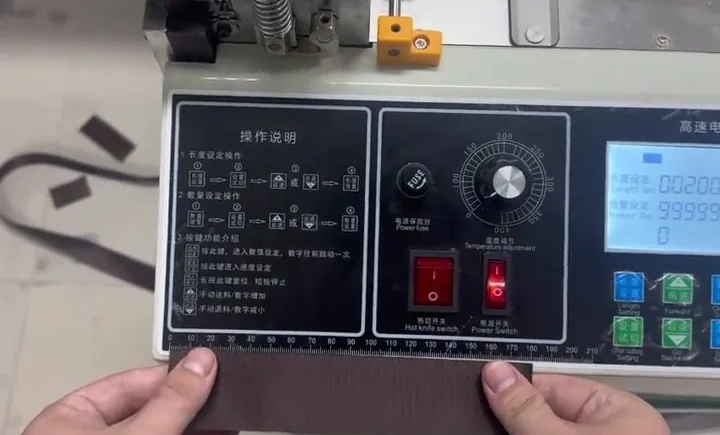
- Set a round length. In the video the panel is set to 200.
- Cut one piece. Use the material you are actually running.
- Measure it flat. Lay it on a rule or tape measure without stretching it. In the video it measures 180, so 20 mm short.
- Note short or long. The fix depends on which way it is off.
03 · COMPENSATION
Check the compensation value
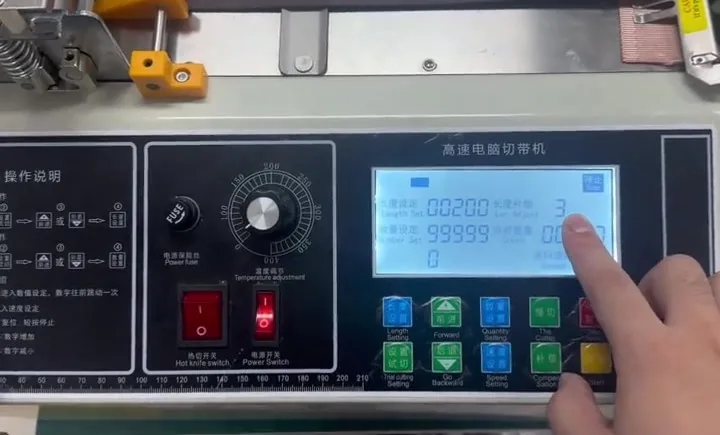
This is the first place to look, and in the video it is the main one. The length compensation sits on the main screen of the control panel next to the set length.
- Read the value. In the video it shows 30.
- Set it back to the default. On the machine in the video the default is 50. If you don't know the default for your machine, ask the supplier before changing it.
- Cut and measure again. In the video the next piece measures 200, matching the setting.
If the compensation was the problem, you are done. Write the default down somewhere near the machine so the next person can check it quickly.
04 · STILL SHORT
Compensation is right, but pieces are still short
Sometimes the compensation is already at its default and the pieces still come out shorter than the setting. The video then resets the feed length while the machine powers on.
- Switch the machine off.
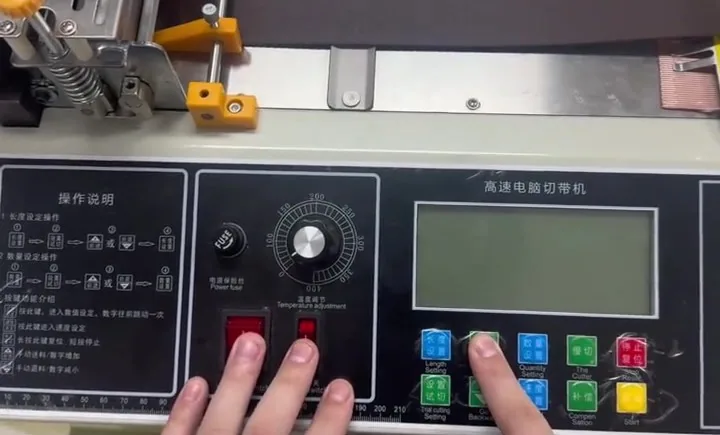
- Press and hold FORWARD. Keep holding it.
- Switch the machine on with FORWARD still held.
- Wait for two beeps, then release. In the video this sets the feed slightly longer, restoring the default once more.
- Cut and measure again.
This button sequence is the one used by the controller in the video. Controllers differ, so confirm the sequence for your own machine before you try it.
05 · TOO LONG
When pieces come out too long
The same idea works the other way. In the video, if 200 is set and the pieces come out at 230 or even 240, the machine is switched off, BACK is held, and the machine is switched on again.
- Hold BACK while switching on. This shortens the base feed length.
- Hold time matters. In the video, how much it shortens depends on how long BACK is held. Hold it briefly first, then cut and measure.
- Repeat in small steps until the piece matches the setting.
06 · OTHER CAUSES
When the settings aren't the problem
The video covers the settings side and leaves the rest for another time. If the compensation and reset don't fix it, look at how the strip is being fed.
- Lengths that vary. If each piece is a different length, the strip is probably slipping at the feed roller, or being dragged by a heavy or tight roll. Settings give a steady error, not a random one.
- Stretchy material. Elastic and soft tapes can stretch as they feed and spring back after cutting. Measure them relaxed, and set the length on a test piece of the same material.
- A new material. A thicker, slicker or stiffer strip can feed differently from the last one. Cut and measure a test piece whenever the material changes.
HESPER EQUIPMENT
HESPER hot and cold tape cutting machines
Four options, each listed with hot and cold knife cutting. Details and specifications are on the tape cutter page.
95 MM
95mm EconomyCutting width 1–95 mm. Button control panel for routine cut-to-length work.95 MM
95mm High-SpeedCutting width 1–95 mm. LCD and buttons.210 MM
210mm TouchscreenCutting width 1–210 mm for wider tapes and webbing.310 MM
310mm TouchscreenCutting width 1–310 mm for the widest strips.? FAQ
Tape cutter length questions
Why is my tape cutter cutting shorter than the set length?
If every piece is short by the same amount, check the length compensation value first. In the video it had been changed from its default, and setting it back fixed the length.
What is the compensation value on a tape cutter?
It is a correction the controller applies to the feed, so the length that comes out matches the length you set. If it is changed, every piece is off by roughly the same amount.
What should the compensation be set to?
The default for your machine. On the machine in the video it is 50. Check with your supplier if you are not sure.
How do I reset the cut length?
On the controller in the video, hold FORWARD while switching on until it beeps twice if pieces are short. Hold BACK while switching on if pieces are long. Confirm the sequence for your own controller first.
Why are my pieces all different lengths?
That points to the feed rather than the settings. Look for slipping at the feed roller or drag from the roll.
Does this work for webbing, elastic and hook and loop tape?
The settings are the same for any material. Stretchy strips like elastic should be measured relaxed, and every new material deserves its own test piece.
How often should I check the length?
At the start of every job and whenever the material changes. One measured piece takes a minute and can save a whole batch.
CUT LENGTH
Pieces Still the Wrong Length?
Send HESPER the length you set, what the pieces actually measure, and the material, its width and thickness. A short video of the panel and a cut is often the quickest way to find the cause.
Send your cutting details · See the tape cutters · sales@hespermachine.com