
The cutting machine is idle while the next process waits for material. If the function menu also asks for a password, it is easy to connect the two: will getting the password make the machine feed again? Menu access and a feeding problem need to be checked separately. Identifying the supplier responsible for the machine and describing exactly what stopped moving, and when, is usually more useful than searching for passwords for the same model.
This matters particularly with a recently acquired used machine, or equipment whose manual and order records are missing. What you need is information that matches its control system and a focused assessment, rather than a guessed code.
First establish whether it is menu access or a timed lock
Notice where the password prompt appears. Does it show only when you open a particular function menu, or is there also a lock message during normal startup or feeding? These situations raise different questions for the supplier. A password prompt alone does not identify the problem.
If the machine was purchased on an installment plan, ask the original seller whether a timed lock was agreed and check the relevant contract and payment records. Some equipment may have a time- or payment-related lock configured under the supply agreement. Whether it exists, what activates it and how it is released depend on that machine and the parties' records. A password prompt alone does not establish that the buyer has an unpaid balance.
If the prompt appeared at the same time as feeding stopped, tell the seller about that timing and ask whether the lock status affects operation. If the two are unrelated, continue investigating the feed problem. This avoids treating an access issue as a hardware failure, or concentrating on the password while overlooking a material jam or transmission problem.
The same model name does not mean the same password or settings
The model on the machine is a starting point for finding information. It is not enough to establish the controller version, function menus or current settings. Similar-looking machines may use different controls, and settings on an individual machine may have changed at delivery or during later use. A password found online for the same model should not be treated as the answer for your machine.
Some function menus include feed calibration or drive settings, so a password prompt does not necessarily indicate a fault. Photograph the complete message and ask the original supplier whether it concerns operator access or setup access, and whether restoring feeding actually requires entering that menu. If settings need changing, have the supplier identify the relevant item first and retain the original value and recovery procedure. That helps avoid disturbing a previously correct cutting setup while addressing a stoppage.
Who you contact matters too. Supplier details on the invoice, order, manual and nameplate are more useful than a model-only search. For a used machine, ask the previous owner about its purchase and repair history. If the original seller cannot be reached, a qualified repair technician can assess feeding or mechanical problems using the controller details and symptoms; timed or payment-related locks should still be clarified with the original seller.
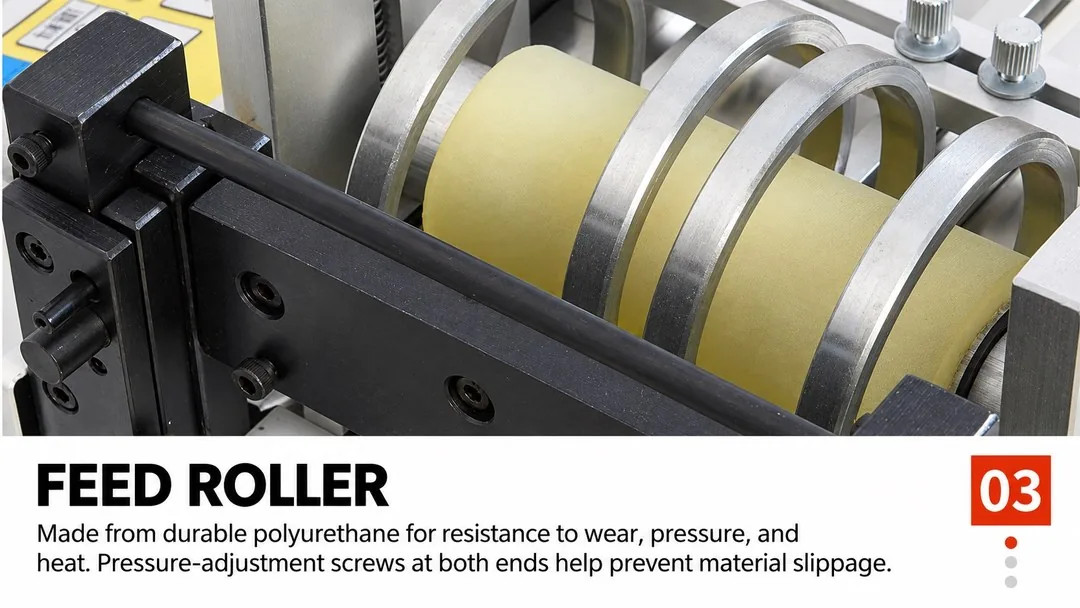
When material will not feed, look at whether the rollers turn
“No material comes out” describes the result. The more useful question is whether the feed rollers move after a feed command. Do they stay still, or do they turn while the material remains in place? Describing that difference reduces guesswork.
If the rollers do not turn at all, record the screen display, any alarm message and what happened before feeding stopped. These observations help a technician distinguish operating-state, control or drive issues, and decide whether mechanical binding needs checking. “Not turning” alone does not establish a failed motor or justify choosing a replacement part.
If the rollers turn but the material does not advance, the investigation changes. Contact between the material and rollers, clamping pressure, roller condition, and resistance at the unwind or guides all deserve attention in context. If slipping started after a material change, tell the supplier how the new material differs in thickness and surface. Simply increasing pressure may not resolve an upstream obstruction and may mark the material.
Keep hands clear of the rollers and blade while observing. Before cleaning, adjusting or touching moving parts, follow the equipment instructions to stop it, isolate power and prevent unintended startup. Electrical and drive checks belong with qualified personnel. The most useful contribution an operator can make is an accurate record of the symptoms, rather than repeatedly running a faulty machine.
A well-framed video says more than “the machine is broken”
When sending a video to the supplier, show the screen message, followed by the rollers and the material's response. An empty collection area after a cut tells much less. Keep guards in place while filming. Showing the relationship between the operator's action and the machine's response helps the supplier decide what needs checking next.
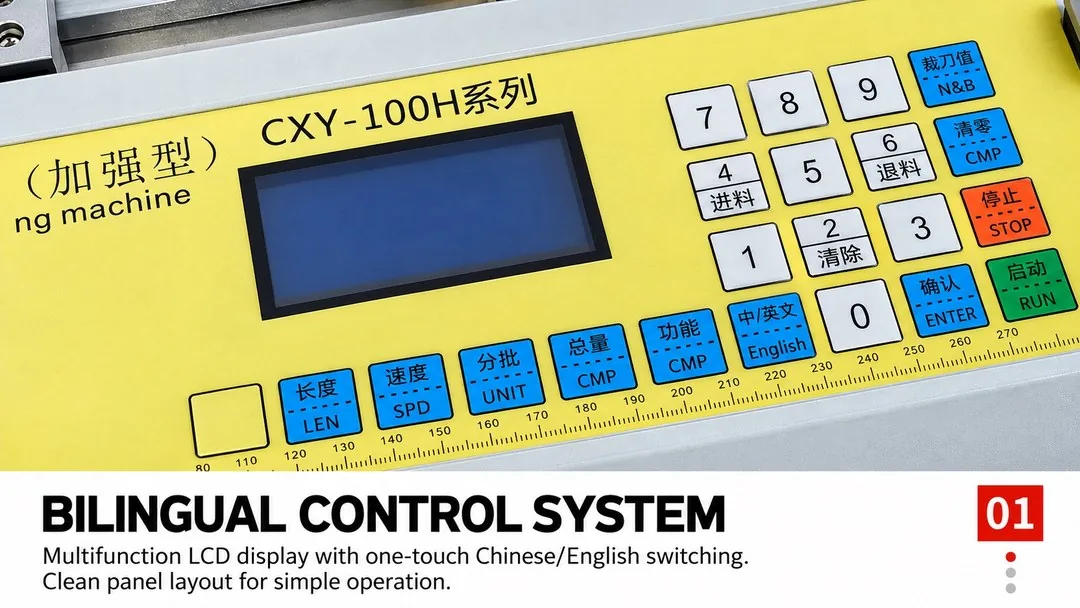
Include nameplate and control-panel photos, and explain whether the problem appeared suddenly or after a material change, a settings change, moving the machine or a repair. If it previously worked normally, describe the material and settings used then. This cannot replace an on-site assessment, but it can narrow the investigation and reduce repeated requests for more photos or information.
Once feeding is restored, return to the production requirement: cut a small quantity of the actual material and check length, edges and feeding stability before continuing the batch. Movement is only the first step. The material must also be ready for the next process.
When choosing the next machine, consider support as well as cutting
A stoppage is a reminder to look beyond speed and cutting width when buying equipment. Ask who provides the manual for the supplied version, whom to contact for setup access, and how the machine details will be linked to the order. For an installment purchase, put any timed-lock arrangement, activation conditions and release process in the order or contract so both parties understand them before use. Retain these documents and the settings recorded at acceptance; they also help when operators or materials change.
For example, the HESPER CXY-100H thin metal and wire mesh cut-to-length machine lists an LCD and keypad with Chinese/English controls, polyurethane feed rollers with pressure adjustment at both ends, adjustable material guides and a nominal cutting width of 100 mm. Understanding these features helps clarify operating and feeding requirements. Suitability still depends on the metal grade, condition, thickness, width, shortest cut length and required edge finish. For mesh, provide wire diameter and aperture as well, and confirm suitability with a sample.
If you are selecting equipment, send material photos, thickness, feed width, target cut length and quantity requirements to sales@hespermachine.com. Whether restoring production or choosing a new machine, the aim is the same: describe the actual material and machine condition clearly so the next decision has a sound basis.